← Trades & Small Business HEPLANOBuild

Your site diary – the memory of your job site.

Projects, photos, progress, defects, working hours and PDF reports — directly on your smartphone.

Projects & progress
Photos & documentation
Defects & obstructions
Working hours & team
PDF reports & export
Offline & secure
79.99 € one-time

No subscription. No recurring costs.

This is a demo with sample data. Nothing is stored permanently.

  • Stored locallyYour project data stays encrypted on your device.
  • No HEPLANO cloudNo ads. No tracking.
  • Offline-capableCore features offline — purchase and optional voice input need internet.
  • Backup & restoreSave your data. Restore it easily.
Features

Everything a job site needs. Nothing it doesn't.

HEPLANO Build covers the daily documentation work on site — no unnecessary complexity, no features you'll never use.

Projects

All your projects at a glance, with address, status and current progress — organized from the first day on site to handover.

Progress

Track the progress of every site area with a simple slider. Every change is documented automatically — no extra taps.

Photo documentation

Attach photos directly to a project, a site area or a specific entry. Mark up defects right on the photo.

Defects & obstructions

Record problems and delays as they happen, mark them open or resolved, and keep a clear, traceable history.

Working hours

Log your team's working hours for the project — no separate account needed for every team member.

PDF reports

Turn your documentation into a professional report — progress, defects, photos and working hours, ready to share.

Search & timeline

Every entry lands in a searchable, chronological timeline — find what happened on site in seconds.

Backup & restore

Save your project data and restore it any time — on the same device or a new one.

Offline by design

No signal on site? No problem. The core features work offline and your data stays on the device. Only the optional voice input uses Android's speech recognition and usually needs internet; HEPLANO does not store audio. The one-time Premium purchase also needs a brief connection.

What HEPLANO Build looks like
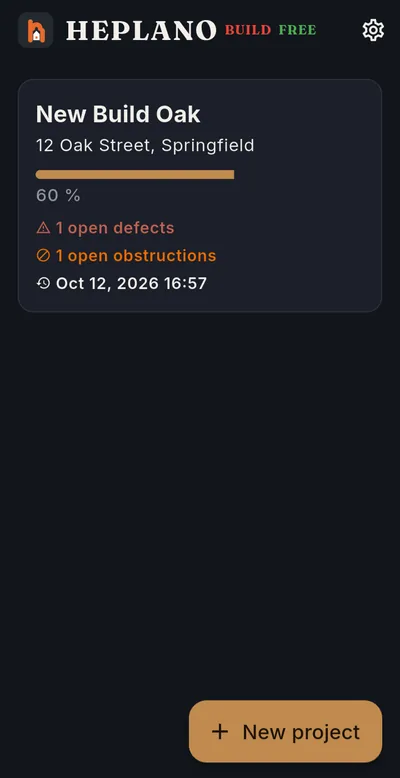
  • HEPLANO Build: All projects at a glance
    All projects at a glanceProgress, open defects and obstructions per project. One project is free.
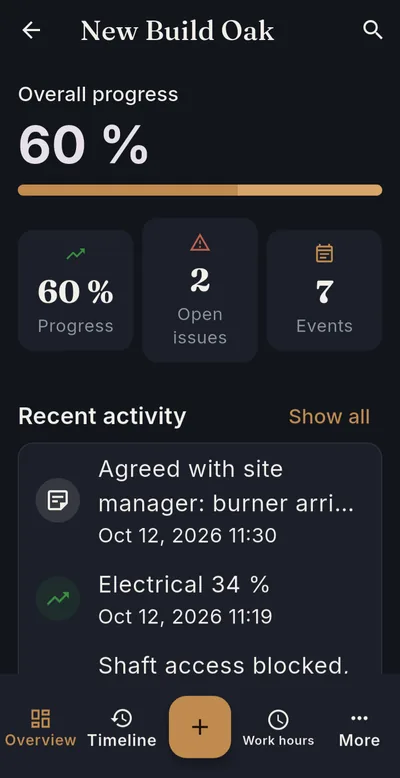
  • HEPLANO Build: Progress per area
    Progress per areaOverall progress, open items and the latest activity of a project.
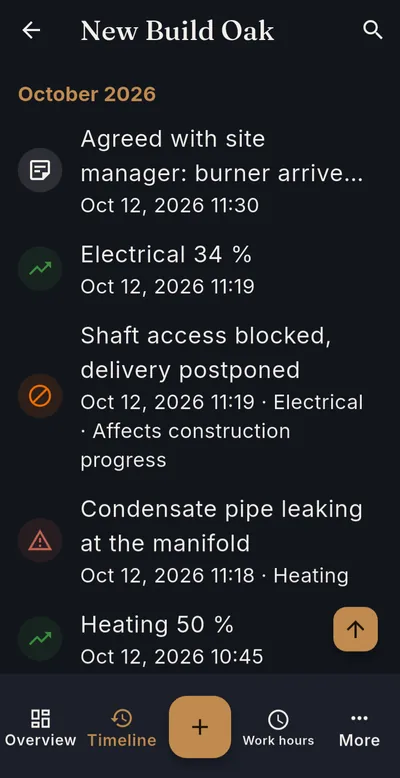
  • HEPLANO Build: The site diary as a timeline
    The site diary as a timelineEvery entry in chronological order, searchable by description, area or location.
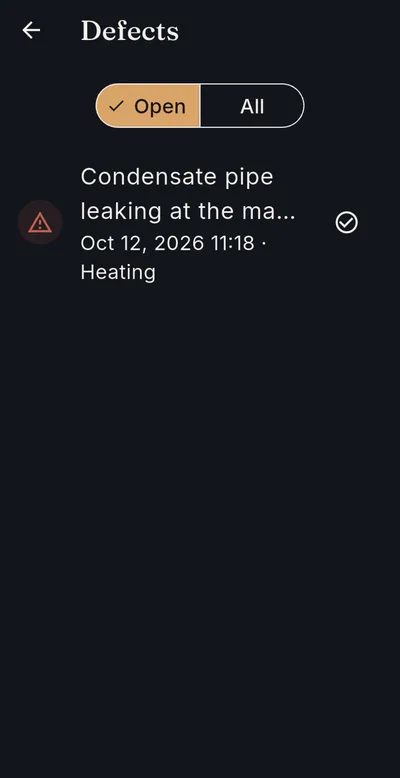
  • HEPLANO Build: Log defects and tick them off
    Log defects and tick them offTrack defects and obstructions as open or done, with photo and area.
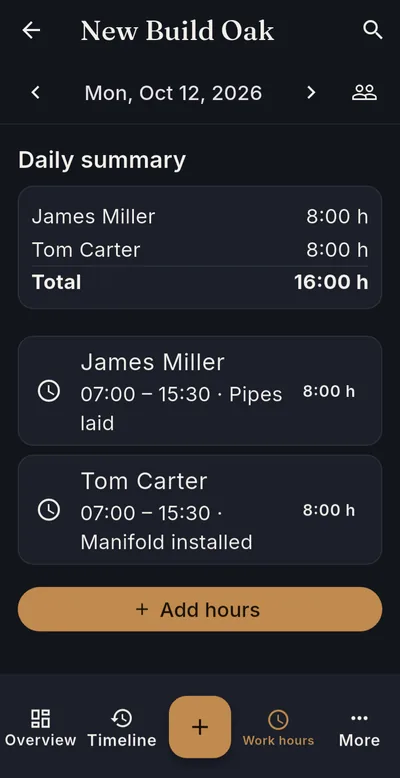
  • HEPLANO Build: Work hours for the whole team
    Work hours for the whole teamLog several workers at once, with a separate note for each worker.
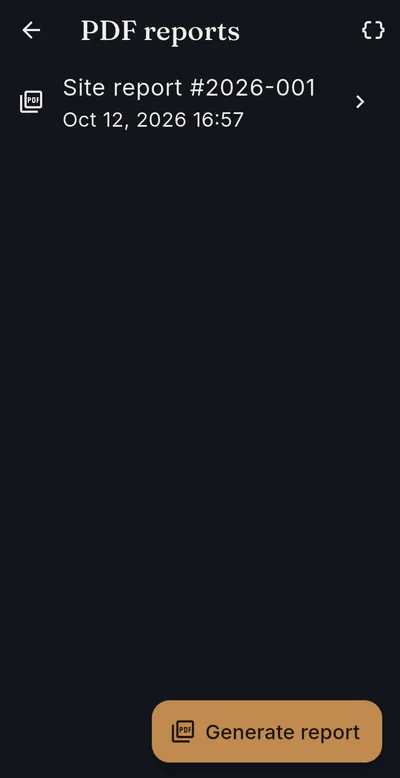
  • HEPLANO Build: PDF reports at the push of a button
    PDF reports at the push of a buttonCreate, preview and share reports for any period.
Sample report

This is what your report looks like.

A real report generated by HEPLANO Build with sample data — progress, defects, obstructions, and working hours, ready to print or share.
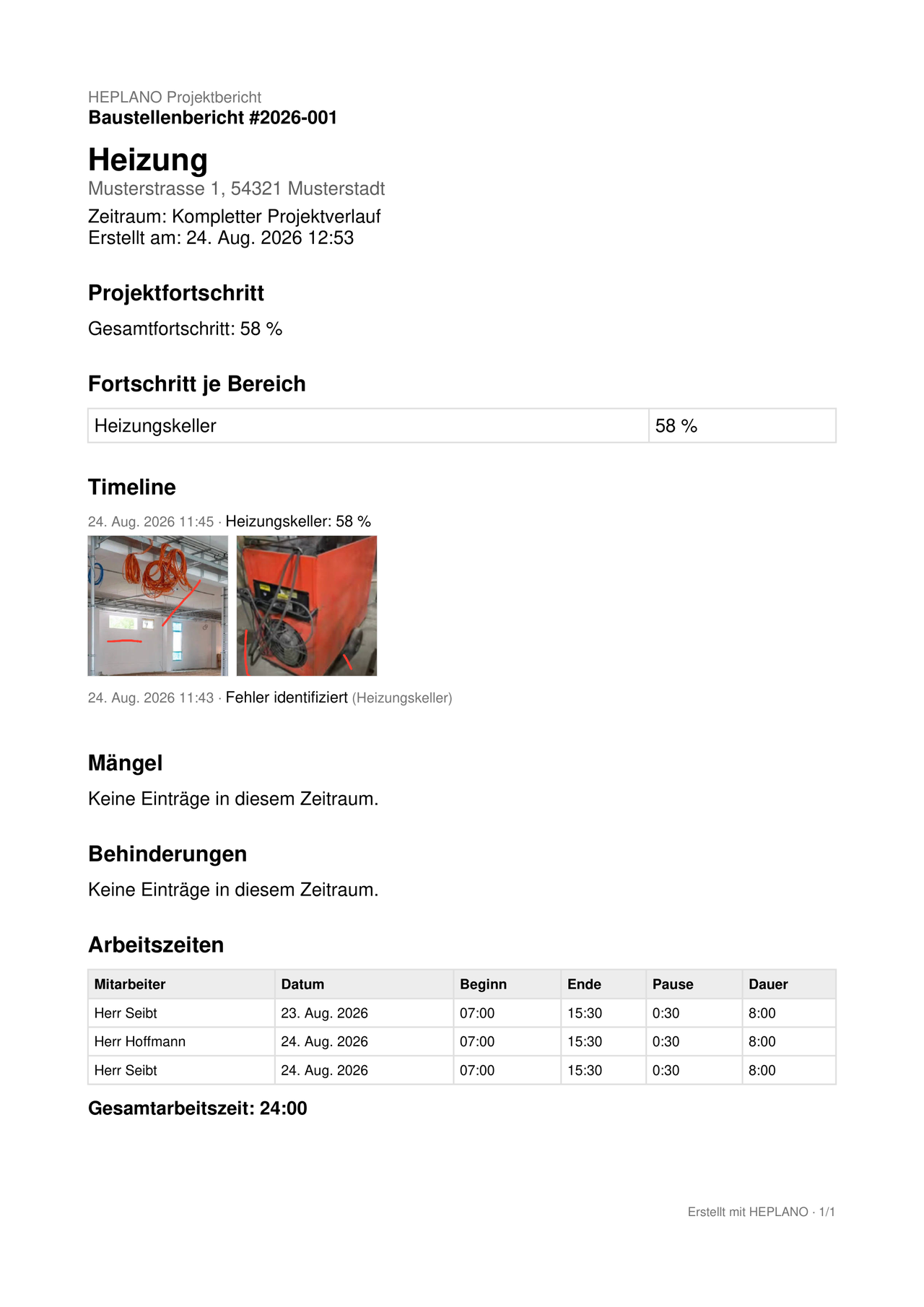
Excerpt of a PDF site report generated with HEPLANO Build, showing project progress, timeline and defects Click to enlarge Open sample report
Why HEPLANO Build

Documenting. That's it.

Many tools try to digitize an entire business — invoicing, scheduling, team chat, customer management. HEPLANO Build focuses on what's actually needed on the job site: clear, reliable documentation.

Simple enough for daily use. Professional enough for real documentation.
Trust

Built to be trusted with your project data

✓

Offline-capable

Core features work without an internet connection — only the one-time Premium purchase, restoring it and the optional voice input need a connection.

✓

Local data

Your project data stays on your device, not on a server.

✓

Encrypted storage

The local database is encrypted.

✓

App lock

Optional biometric or device-code lock for the app.

✓

Backup & restore

Encrypted backups you control, restorable any time.

✓

Android

Available for Android on Google Play. An iOS version has not been announced at this time.

Pricing

HEPLANO Build Premium

one-time
79.99 €

Pay once. Use it for as long as you need it.

  • Unlimited projects
  • Progress documentation
  • Photo documentation
  • Defects & obstructions
  • Working hours
  • PDF reports
  • Backup & restore
  • Offline use

Now available for Android on Google Play. An iOS version has not been announced at this time.

Buy once, verified through your Google account — no separate HEPLANO account needed.

Interactive demo

Try HEPLANO Build — no install required

Explore a real example project directly in your browser. All data shown is sample data; nothing you do here is saved permanently.

Open the demo

This is a demo with sample data. Nothing is stored permanently.

FAQ

Frequently asked questions

HEPLANO Build is a mobile app for documenting construction and trade projects: progress, photos, defects, obstructions, working hours and PDF reports — directly on your smartphone.
Tradespeople, small trade businesses, construction companies, site managers and anyone who documents job sites and needs a simple, reliable way to do it.
Yes. HEPLANO Build's core features work offline. Your data is stored locally on your device. Exception: the optional voice input usually needs an internet connection (see “How does voice input work?”).
HEPLANO Build Premium costs 79.99 € as a one-time purchase.
No. There is no monthly or yearly subscription for HEPLANO Build Premium — you pay once.
Premium unlocks the full feature set of HEPLANO Build. The purchase is handled and verified through your Google Play account.
No. HEPLANO Build doesn't require its own account. Premium is instead tied to your Google account.
The Premium license is verified through your Google account and can be unlocked again on a new device via “Restore purchases”. The actual project data can be transferred using backup and restore.
Select “Restore purchases” in the Premium section of the app. HEPLANO Build checks your Google account for an existing purchase and unlocks Premium again if found.
Yes. HEPLANO Build Premium supports an unlimited number of projects.
Yes. You can add team members to a project and log working hours for them — no separate account is required for each team member. You can log the same working time for several team members at once, with an individual note for each.
Yes. HEPLANO Build can generate a PDF report from your project documentation, including progress, defects, photos and working hours.
You can create an encrypted backup of a project and restore it later — on the same device or a different one.
HEPLANO Build is available for Android on Google Play. An iOS version has not been announced at this time.
Your project data is stored locally on your device in an encrypted database, and you can optionally lock the app with your device's biometrics or passcode.
Yes. You can draw directly on any photo with your finger — for example to highlight a defect. The original photo stays unchanged.
Entirely on your device, in an encrypted local database. HEPLANO Build doesn't automatically upload anything to a cloud.
No. HEPLANO Build doesn't request location permission and doesn't use GPS data.
HEPLANO Build is available in 16 languages: German, English, Polish, French, Italian, Spanish, Portuguese, Dutch, Danish, Norwegian, Swedish, Romanian, Croatian, Serbian, Bulgarian, and Turkish. The app follows your device's system language automatically, but you can also switch it manually in the settings.
The affected project data is then unrecoverable — HEPLANO Build stores data locally on the device only. We recommend creating a backup regularly.
Only if you set a password when creating it. Without a password, the backup is encrypted with a key that's stored only on the original device — such a backup can then only be restored there.
Yes. Besides PDF reports, the same content can be exported as a JSON file, for example for your own processing. Photos aren't included in the JSON export, but they are in the PDF report.
Yes, both lists can be cleaned up individually with a swipe gesture.
Refunds go through Google Play's return policy, not through HEPLANO Build directly.
Yes. The free version is fully functional — photos, PDF reports, backup, working hours, employees, and app lock all work without a purchase. The only limit: you can create exactly 1 project at a time. Premium (one-time payment of €79.99) unlocks unlimited projects. An archived project still takes up the slot — how to free it up is explained further down in this FAQ.
Any payment method Google Play accepts in your country — Google Play handles the entire payment process; HEPLANO Build itself never sees your payment details.
Yes. As long as you're signed in with the same Google account on all devices, tapping "Restore purchases" once is enough.
No. Employees don't get their own access to the app — you (or whoever's responsible) enter each employee's working hours directly in the project, with no separate account or login needed.
No. HEPLANO Build creates documentation reports — progress, photos, defects, working hours — not invoices. For invoicing, there's the separate app HEPLANO Rechnung.
HEPLANO Build runs on Android 7.0 (API level 24) and above.
HEPLANO Build can be installed and used on tablets, but it's primarily designed for smartphones — there's currently no dedicated tablet layout.
No. Apart from the free version's 1-project limit, there are no further restrictions — neither on the number of photos nor on storage space within a project.
By email at dev@heplano.com — you'll also find this contact directly in the app under Settings → About HEPLANO Build.
No. The PDF report is deliberately kept purely text-based, with no logo or watermark — the focus is on clear, no-frills documentation.
No. In both the free and Premium version you can add as many employees and areas per project as you like — the free version's only limit concerns the number of projects itself.
Yes. When you open a report, your operating system's share and print functions are available directly — you can send the report by email or WhatsApp, for example, or print it right away.
Your data stays usable regardless: HEPLANO Build never stores anything on a server of its own — everything lives exclusively, locally, on your device.
No. The demo shows sample data to try out; nothing you enter there is stored permanently or sent to HEPLANO Build.
Use the microphone icon to dictate descriptions and notes. Speech recognition is handled by your device's speech recognition service (on Android, usually Google) and mostly needs an internet connection; what you say is processed there. HEPLANO Build does not store any audio and does not receive any voice recordings. The app points this out before first use. Voice input is optional — you can type every text instead.
Camera (for photos, requested only when you take one), microphone (only for the optional voice input), and biometrics or device code (only for the optional app lock). HEPLANO Build does not need access to your location, contacts, calendar, or SMS.
The free version has room for 1 project — an archived project counts. First save the finished project as a PDF report or backup, archive it, and then delete it permanently (project settings). The slot is then free again. An empty project, for example one you used to try things out, can be deleted right away. “Import as new project” in the backup screen also counts as an additional project. With Premium (one-time €79.99) you keep as many projects as you like in parallel and in the archive.
An archived project is read-only but fully preserved and can be reactivated at any time. The data is only gone once you permanently delete the project afterwards.
Optional under Settings → App protection: when you open the app, HEPLANO Build then asks for your fingerprint, face, or device code. The app lock is off by default. The app does not receive any biometric data, only the result from the operating system.
On the project list, tap the gear icon at the top (Settings), open Premium and tap “Buy Premium”. The purchase runs through Google Play, costs 79.99 € once and is not a subscription. It is tied to your Google account.
The app then reports that no previous purchases were found. Check that you are signed in to the Play Store with the same Google account you used to buy Premium and that the device is online. Then try again under Settings → Premium → “Restore purchases”. If that does not help, write to dev@heplano.com and include the order number from your Google Play payment confirmation.
The free version does not expire. Your one project with all its entries, photos, reports and backups stays usable. You only need Premium (one-time 79.99 €) for additional projects.
No. HEPLANO Build stores everything locally on your device and does not sync automatically between devices or people. So several people cannot work in the same project at the same time. To pass information on, use PDF reports and the share function.
Each area has the progress of its most recently recorded progress entry; without an entry it is at 0 %. The overall progress of the project is the simple average of all areas. The value may also go down, for example from 80 to 60 %, if you document it that way.
Only backups are encrypted. Exported PDF reports and JSON files are not encrypted: anyone who receives the file can read it. Share them only with people who are allowed to see them and choose the recipient carefully when sharing.
Not automatically. HEPLANO Build is a tool for documenting your site. Whether a site diary is required by contract, by authorities or by the client, and in what form, depends on the individual case. This is not legal advice: if in doubt, clarify the requirements with your client, the authority or a professional adviser.
No. The working hours in HEPLANO Build are meant for project documentation and are not intended as legally required time recording. Please clarify the obligations that apply to your business yourself or with a professional adviser; this is not legal advice.
A defect is a found fault or shortcoming that you record with area, description and photos; its status is Open or Resolved. An obstruction is a circumstance that hinders or delays the work, for example missing material; its status is Open or Done. For obstructions you can also set “Affects construction progress”. The app does not make any legal assessment.
Open More → Defects or Obstructions. On the entry, tap the icon “Mark as resolved” (defects) or “Mark as done” (obstructions). The entry stays traceable in the timeline and reports; with the filter All you also see completed entries.
Yes. Open More → PDF reports, tap “Generate report” and under Report period choose either Complete project history or Choose a period with a start and end date.
Yes. Open the entry in the Timeline and tap Edit or Delete. If you delete the most recent progress entry of an area, HEPLANO Build recalculates the area's progress. Entries in archived projects are read-only.
In the project, tap the magnifying glass at the top (Search) and search by description, area or location. You can filter by type and period. All entries are also listed chronologically in the Timeline.
Check that the device is online, that you have allowed the microphone permission for HEPLANO Build in the Android settings, and that a speech recognition service (on Android usually Google) is available on the device. If the app shows “Voice input isn't available on this device”, you can simply type all texts.
Open the HEPLANO Build page on Google Play and write a review there. Honest feedback helps us and other tradespeople decide. You can also send bugs and wishes directly to dev@heplano.com.
Help

Help & guides

Step-by-step guides for projects, photos, defects, working hours, PDF reports, backup and Premium.

Open the help page

HEPLANO Build Premium

Projects, photos, progress, defects, working hours and PDF reports — directly on your smartphone.

Buy now