HEPLANO RhythmHEPLANO Rhythm: The calm diary for your eating times

HEPLANO Rhythm: The calm diary for your eating times

HEPLANO Rhythm notes when you eat. One tap, and you see how much time has passed since your last entry. Nothing more: no calories, no weight, no judgement.

Sidst opdateret 02.11.2026

Hent på Google Play

HEPLANO Rhythm is a calm diary for your eating times. With one tap you note whether it was a meal or a snack and see how much time has passed since your last entry. The app does not count calories, does not record weight and does not rate anything. It gives no recommendations and never asks you to wait longer.

What the app does

  • Entries: note meals and snacks with a time, also afterwards, optionally with how long the meal lasted.
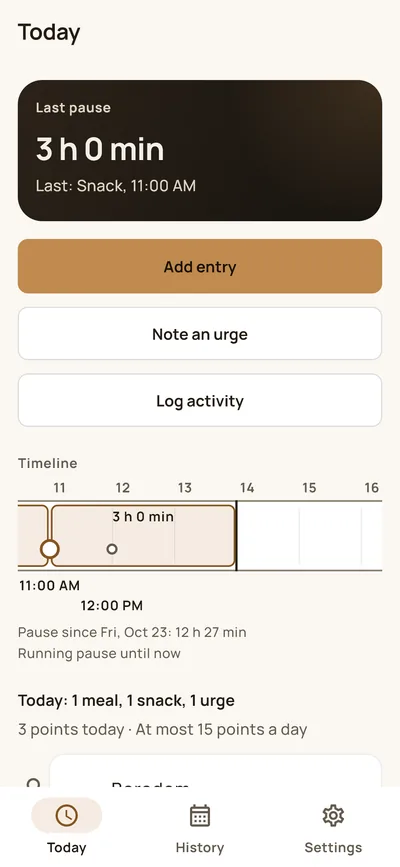
  • Timer: shows the time since your last entry. If time information puts you under pressure, hide it in the settings.
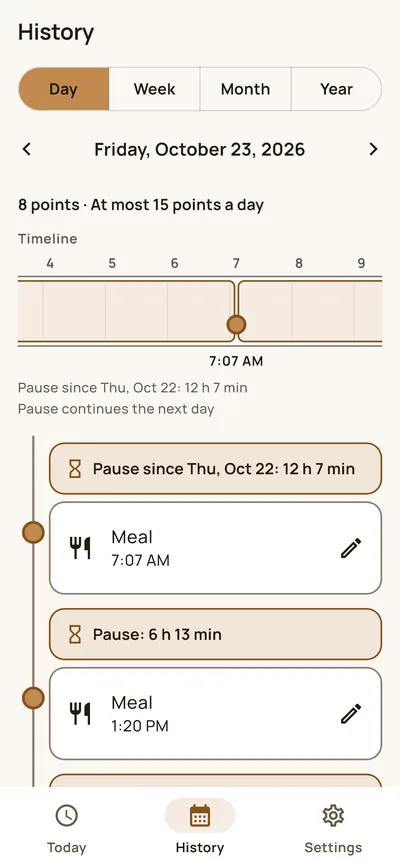
  • Timeline and time band: the day as a line with all entries and the breaks in between.
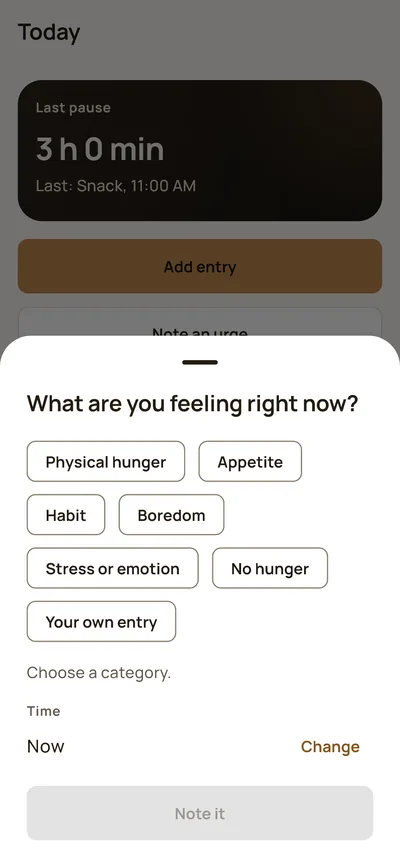
  • Urges: when you feel like eating something, you note it with a category: physical hunger, appetite, habit, boredom, stress or emotion, no hunger, or your own entry. An urge is not an entry and does not change the timer.
  • Movement: note a walk, strength training or something else, optionally with a duration. The app gives no recommendation about it.
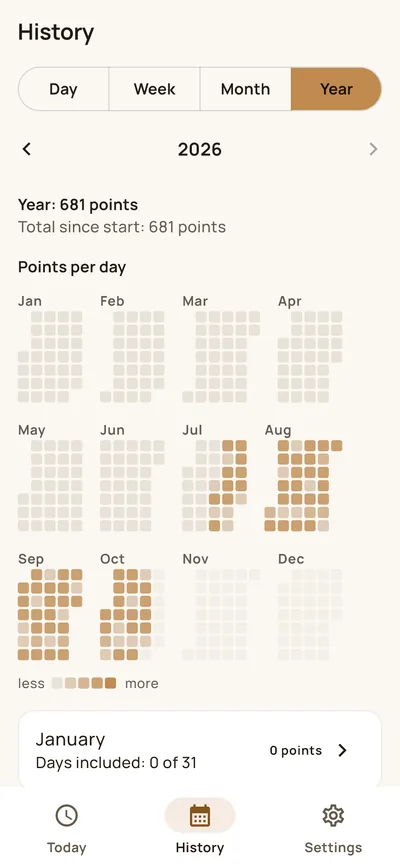
  • History: day, week, month and year, with a calendar and a year overview. Month and year are part of Premium. You mark days as fully documented yourself; only those days go into the figures.
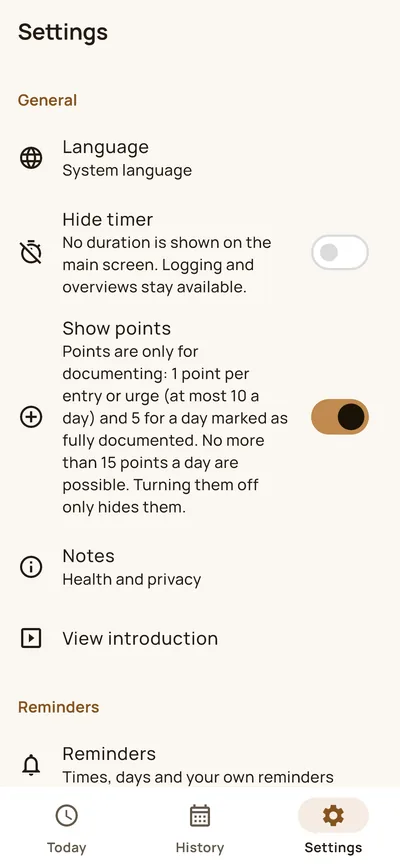
  • Points (optional): they exist only for documenting, never for behaviour, at most 15 a day. You can hide them.

Reminders

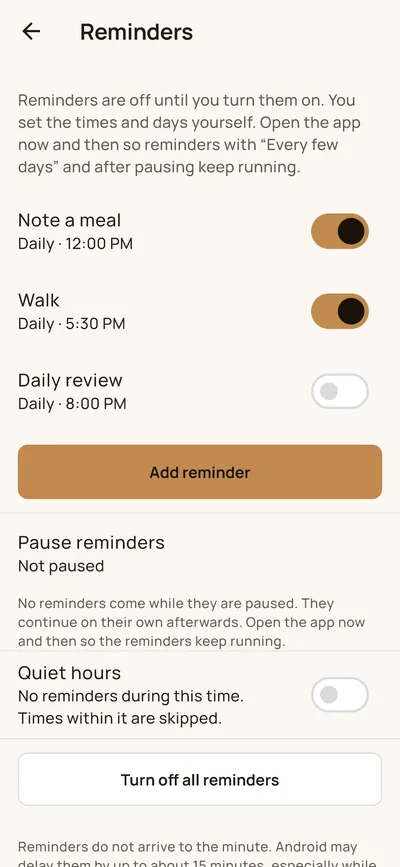
Reminders are off until you turn them on. You set the times and days yourself: daily, on certain weekdays, every few days or monthly, with several times. You can pause reminders, set quiet hours for the night and create your own reminder with its own name, for example “Walk”. Two simple daily reminders are free; further reminders, weekdays, several times, pausing, quiet hours and free reminders are part of Premium. The texts are neutral and never contain data from your diary. Android may delay reminders by up to about 15 minutes.

Your data belongs to you

  • No account, no cloud, no ads, no tracking.
  • All entries are stored encrypted on your device only.
  • Optional app lock with fingerprint, face or device PIN, and a screen protection against screenshots and preview images.
  • Your own password-protected backup, which you store yourself. The password cannot be recovered.
  • Export as JSON or CSV (unencrypted, you pass the file on yourself) and “Delete all data” at any time.
  • A home screen widget shows the last entry and the running break. While it is placed, this information is stored unencrypted in the private storage of the app. With the app lock on, it only shows “Open”. The widget is part of Premium.

Free and Premium

Adding entries, the timer, day and week view, points, two simple daily reminders, backup, export and app lock are free. Premium unlocks the month and year view, further and advanced reminders, free reminders and the widget. You buy it as a subscription or once through Google Play; before the purchase the app shows price, term, renewal and cancellation. There is no trial that turns into a subscription on its own. Your data always stays visible, also without Premium.

Important

HEPLANO Rhythm does not replace medical advice. The app does not rate your eating times and gives no recommendations. If you have diabetes, take medication, are pregnant, or have or have had an eating disorder, please talk to a professional before changing your eating habits. The app is for adults.

Available in German, English and Polish for Android.
Guides

What HEPLANO Rhythm looks like

  • HEPLANO Rhythm: Today
    TodayTime since the last entry, the time band and the entries of the day.
  • HEPLANO Rhythm: Note an urge
    Note an urgeSeven categories, including “No hunger” and your own entry. Nothing is preselected.
  • HEPLANO Rhythm: Day view
    Day viewA day as a timeline with entries and the breaks in between.
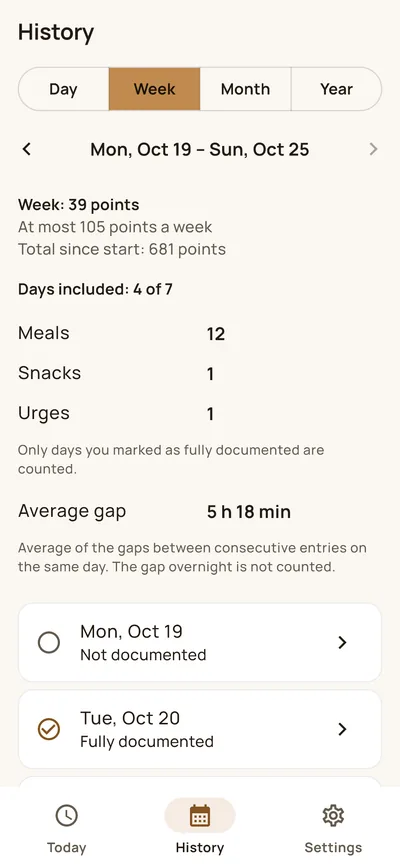
  • HEPLANO Rhythm: Week
    WeekThe week at a glance, only with days you marked as fully documented.
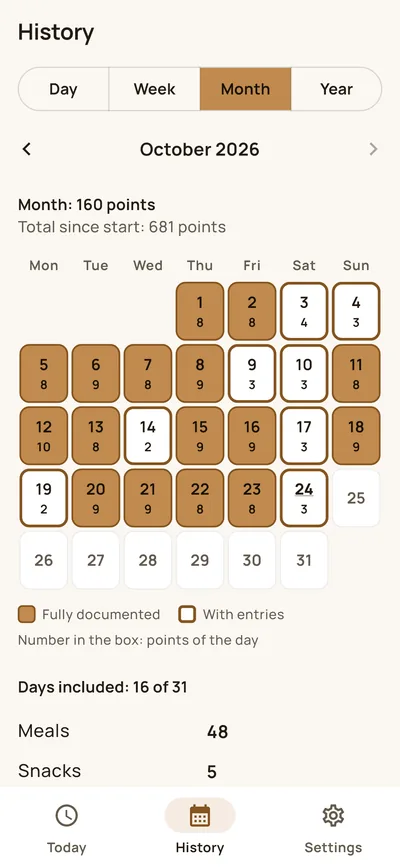
  • HEPLANO Rhythm: Month
    MonthA calendar with marked days and days with entries.
  • HEPLANO Rhythm: Year
    YearA year overview with one square per day.
  • HEPLANO Rhythm: Reminders
    RemindersYour own times, weekdays and your own reminders. Off until you turn them on.
  • HEPLANO Rhythm: Settings
    SettingsHide the timer, show or hide points, app lock, backup and export.

Frequently asked questions about HEPLANO Rhythm

What is HEPLANO Rhythm?

A calm diary for your eating times, for Android. With one tap you note whether it was a meal or a snack and see how much time has passed since your last entry. The app does not count calories, does not record weight and does not rate anything.

Where can I get HEPLANO Rhythm?

HEPLANO Rhythm is available on Google Play for Android.

What does the app cost?

The app is free to use and has no ads. Premium unlocks further features (see below) and is a subscription or a one-time purchase through Google Play. Before the purchase the app shows the price, term, renewal and cancellation; there is no trial that turns into a subscription on its own. Your data always stays visible, also without Premium.

Who is the app for?

Adults who want to note their eating times for themselves. It does not replace medical advice and is not a medical device. If you have diabetes, take medication, are pregnant, or have or have had an eating disorder, please talk to a professional before changing your eating habits.

Does the app rate my eating times?

No. It shows what you entered and gives no recommendations. It never asks you to wait longer or to go without food. Eating is always fine.

Which languages does the app have?

German, English and Polish. It follows the system language of your phone or the language you choose in the settings.

What is the timer?

It shows the time since your last entry, for example “3 h 0 min”. If time information puts you under pressure, hide it in the settings; entries and overviews stay usable.

Can I add or change entries afterwards?

Yes. You choose the time when you add an entry and can change or delete entries later. For a meal you can enter how long it lasted; the break then counts from the end.

What is an urge?

A moment in which you feel like eating something. You note it with a category: physical hunger, appetite, habit, boredom, stress or emotion, no hunger, or your own entry with your own name. An urge is not an entry and does not change the timer. No category is preselected.

Can I note movement?

Yes: a walk, strength training or something else, optionally with a duration. The app gives no recommendation and makes no statement about an effect.

What does the history show?

Day, week, month and year. The day shows a timeline with entries and breaks, the week an overview, the month a calendar, the year an overview with one square per day. Month and year are part of Premium.

What does “fully documented” mean?

You mark a day yourself when you have entered everything for it. Only marked days go into the figures, so that incomplete days do not distort the values. The app does not ask you to do it.

What are the points?

A voluntary counter: one point per entry, urge or movement, at most 10 a day, plus 5 for a day marked as fully documented. More than 15 points a day are not possible. There are no streaks and no deductions. Points exist only for documenting, never for behaviour. You can hide them in the settings.

How do the reminders work?

They are off until you turn them on. You choose the type (note a meal, daily review, close the day, review of a month or year, or your own reminder with its own name), the times and the rhythm: daily, on certain weekdays, every few days or monthly. You can pause them or set quiet hours. The texts are neutral and never contain data from your diary. Two simple daily reminders are free; further reminders, weekdays, several times, pausing, quiet hours and free reminders are part of Premium.

Do reminders arrive to the minute?

No. Android may delay reminders by up to about 15 minutes, especially while the screen is off. Open the app now and then so that reminders with “Every few days” and after pausing keep running.

Does anyone see the text of a reminder on the lock screen?

Yes, a notification can appear on the lock screen. So do not write anything private in the name or text of your own reminder. The app never inserts data from your diary.

Where is my data stored?

Only on your device, in an encrypted database. There is no account and no cloud. The app does not send your entries to a server.

Which permissions does the app need?

Notifications (only when you turn on a reminder), biometrics (only for the app lock), start after restart (so that reminders keep running) and vibration. The app also contains permissions for internet and billing through Google Play, which are needed for buying Premium. The app only asks Google Play whether a purchase exists; your entries are not transmitted.

Can I protect the app with a lock?

Yes. The app lock uses fingerprint, face or the PIN of your device. A screen protection prevents screenshots and the preview image in the app switcher.

How do I back up my data?

With a backup: one file, encrypted with a password you choose. You store it yourself, for example in your cloud or on a computer. The password cannot be recovered. Without the password the file cannot be read.

Can I export my data?

Yes, as JSON or CSV. These files are not encrypted. You decide where to send them.

What does the home screen widget show?

The last entry with its time and the running break. You place it on the home screen yourself. While it is there, this information is stored unencrypted in the private storage of the app. With the app lock on, the widget only shows “Open”. The widget is part of Premium.

How do I delete all data?

In the settings under “Delete all data”. This removes the database, the key and the widget data from your device. It cannot be undone. A backup file you stored yourself remains until you delete it.

How do I reach the developer?

By email at dev@heplano.com. Do not send health data unless necessary.

Hvad synes du om HEPLANO Rhythm?

HEPLANO Rhythm udvikles af et lille team uden annoncebudget. Ærlig feedback – også kritik og ønsker – hjælper os med at forbedre appen og hjælper andre med at afgøre, om den passer til dem.

Bedøm på Google Play →